
WiFi Caregiver Call Button for Elderly at Home w App Notification, Elderly Monitoring, Caregiver Pager, Life Alert Systems for Seniors No Monthly Fee, Alert Button for Seniors…
$22.96
Description
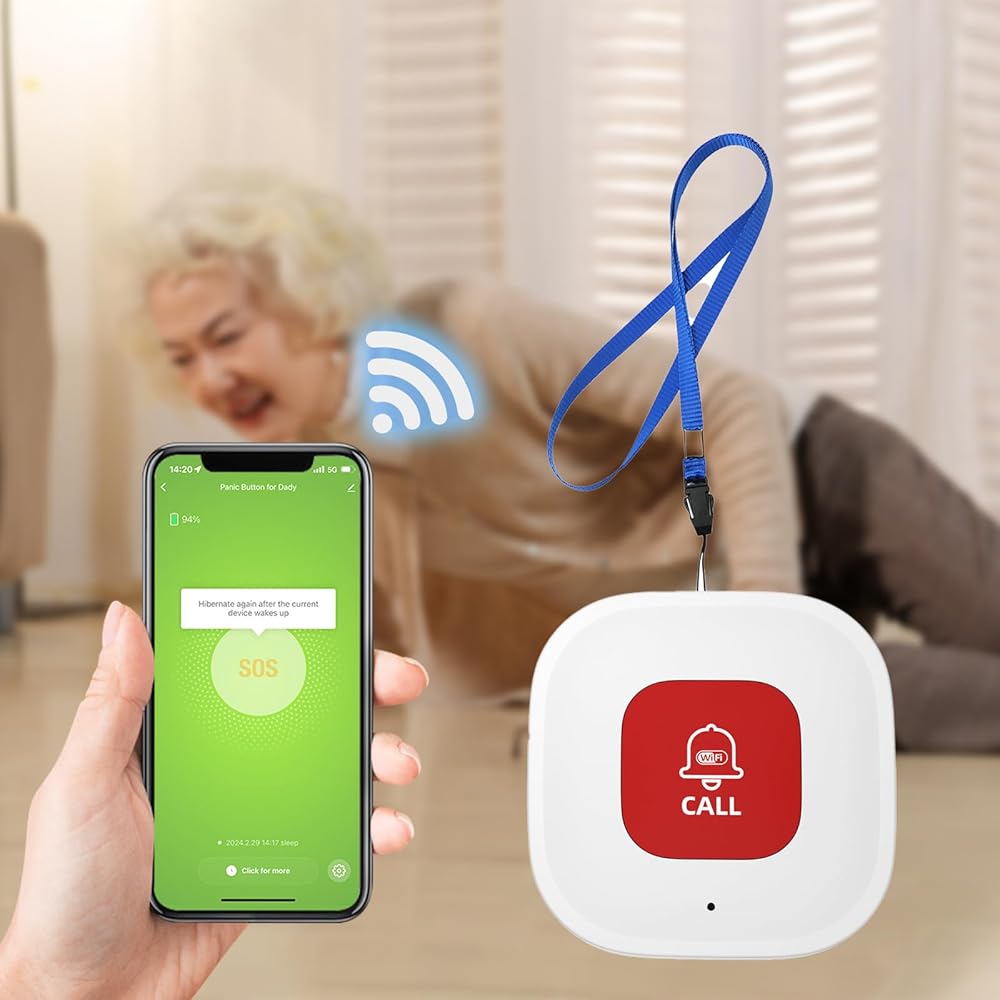
- WiFi Smart, Real-time App Notification: No gateways or complex wiring required; The caregiver call button connects to WiFi in a few steps, when press the panic button, you will receive an real time app notification on your phone, no matter where you are
- Note: 1. The alert button only supports 2.4G Wi-Fi, not 5G Wi-Fi; 2. Keep the call button for elderly within 15 meters of the router; 3. App notification is free, no monthly fee needed, but SMS, phone, email alerts require a subscription
- Multiple People Sharing: Share with more family members through the sharing function in the App; After pressing the caregiver pagers for the elderly, the person you shared with can also receive alarm MSG, allowing multiple family members to participate
- Easy to Use, Versatile Applications: Double-sided tape and lanyard are included, the senior button can be worn or attached to a wall; This emergency button for the elderly can be used at home, in nursing homes, hospitals, clinics, and more
- Present for the elderly: This elderly monitoring system is an elderly assistance product, suitable for the elderly and others who need care; Gives the sick or elderly some privacy and independence, while providing peace of mind for their family members
Additional information
| Number of Batteries | 1 Lithium Polymer batteries required. (included) |
|---|---|
| Control Method | Touch |
| Mounting Type | Wall Mount |
| Manufacturer | lora |
| Part Number | CF101-WIFI |
| Item Weight | 1.76 ounces |
| Product Dimensions | 1.97 x 0.63 x 1.97 inches |
| Country of Origin | China |
| Item model number | CF101W |
| Batteries | 1 Lithium Polymer batteries required. (included) |
| Batteries Included | Yes |
| Batteries Required | Yes |
| Battery Cell Type | Polymer |
| Description Pile | Lithium-Ion |
| Warranty Description | 2 year |
8 reviews for WiFi Caregiver Call Button for Elderly at Home w App Notification, Elderly Monitoring, Caregiver Pager, Life Alert Systems for Seniors No Monthly Fee, Alert Button for Seniors…
You must be logged in to post a review.


Edward Brown –
I tried another brand first and could not get it to work (I’m an engineer). This one was so easy to set up I almost couldn’t believe it was done. I bought a second one to keep in another room and it was just as easy to add to the Tuya app. They both work as they should. It makes me relieved to know that when my wife needs me I don’t have to worry about whether I hear her calling to me.
Aditi Kulkarni –
Alarm is very useful for disabled people to alert people in the house or garden.
Michael Gass –
We purchased this emergency alert button for mom. It works through her home WiFi and app that is downloaded on our smart phones. It’s inexpensive to purchase and you don’t have to pay a subscription. It will alert me and my two brothers no matter where we are. Mom has fallen so many times without her cell phone this will be a huge help. I wish we’d discovered it sooner!
Sandra –
I don’t know why the advertised that it works even if your on the other side of the world because it didn’t work even two houses away and then it was still hit and miss. Not satisfied at all.
Chappel Fisher –
My Mom loves this.
Brenda OLeary –
My mother’s bedroom is on the 1st floor and my bedroom is on the 2nd floor. I attached the button on her bed table and she can alert me when she needs me. I was outside doing yard work and it worked as well. The notifications on my phone are loud and alerts me right away
Tera Curci –
First off, it’s a little misleading to say no subscription required. You absolutely have to pay if you want to be notified on your phone when the button is pressed. That’s why I bought it. I already have a button that rings an alarm in the house. But I wanted something to notify me when I am out of the house. I paid $10 for 100 calls. I have already used 4 just testing it. I don’t expect my dad to need it often so hopefully that lasts a long time. The notification could be MUCH better. It’s literally just a small popup with icon that appears in the notifications bar. I will really have to pay attention to notice this. I was hoping it’d be a full screen notification given the purpose of the device. But for the price I guess it’s pretty good. I haven’t tested how long the charge lasts etc. Also, our house is pretty small so he really can’t get far from the router. Not sure how it works for large facilities.
Denise Perez –
This button was reasonably priced and easy to set up. The alarm is a little much. I wish you could select different tones.